

4 Cross Border Tax Tools for Singapore Firms and Foreign Founders

Ray Tay
Cross border tax checklist for foreign founders in Singapore: four planning tools, IRAS 30 day requests, transfer pricing files and APAs.
Published: 24 September 2026 · Reviewed by Ray Tay, Co-Founder & Managing Director, VIVOS PTE. LTD. (ACRA Filing Agent FA20240323 · MOM EA Licence 24S2425)
Xero suits startups, freelancers, and single-entity SMEs that want fast setup and low monthly cost. NetSuite suits scale-ups and regional groups that need multi-entity consolidation, inventory control, and integrated ERP modules. The right pick depends on your revenue stage, entity count, and how much complexity you’re managing across currencies, GST filings, and reporting.
TL;DR:
- Small companies with simple operations should stick with Xero to keep costs low and implementation quick, especially if they do not need multi-entity consolidation.
- Companies expanding inventory management, revenue recognition complexity, or connecting multiple apps should evaluate NetSuite once they reach two or more subsidiaries and manual processes become burdensome.
- Budgeting for ongoing app subscriptions, integration maintenance, and data reconciliation is crucial, as stacking third-party apps can approach or exceed NetSuite’s licensing costs at larger scales.
- Implementing NetSuite typically takes ten to twelve weeks for a single entity and six to twelve months for multi-entity setups, with poor data quality and unclear ownership as common pitfalls.
- Founders should make the platform choice based on entity structure and revenue recognition needs rather than company size or ambition, to avoid costly early upgrades.
Neither wins outright. Xero handles single-entity bookkeeping, GST F5 filing, and InvoiceNow e-invoicing at a fraction of NetSuite’s cost, which makes it the right call for most companies in their first two to four years. NetSuite earns its higher price when you’re consolidating multiple subsidiaries, tracking inventory across warehouses, or recognizing revenue on multi-year contracts.
The two platforms below aren’t really competing for the same buyer. One is an accounting app that does its job well. The other is a full ERP that happens to include accounting as one module among many.
| Dimension | Xero | NetSuite |
|---|---|---|
| Best for | Startups, freelancers, single-entity SMEs | Scale-ups, multi-entity and regional groups |
| Pricing model / sample SGD range | Tiered monthly plans, roughly S$45 to S$150/month | Quote based, named-user licensing; implementations often start in the low tens of thousands SGD |
| Scalability / multi-entity | Single entity per subscription; multiple entities need separate logins | Native OneWorld multi-entity and multi-currency consolidation |
| Native modules | Core GL, AP/AR, basic inventory add-on | Inventory, CRM, order management, revenue recognition built in |
| Implementation time & complexity | Days to a few weeks | Ten to twenty weeks for mid-range projects; longer for complex data |
| Integrations & bank feeds | Strong third-party app marketplace; feeds for major Singapore banks | Fewer third-party apps needed since modules are native; feeds configured during implementation |
| Reporting & analytics depth | Solid standard reports, good for single-entity | Consolidated, multi-entity reporting with deeper drill-down |
Xero was built to be an accounting app. NetSuite was built to be an ERP that happens to include accounting. That distinction shapes almost everything else in this comparison.
Xero runs on a single-entity model. Each subscription covers one company file, one set of books, one currency as the base (though it supports multi-currency transactions within that entity). If you incorporate a second subsidiary in Malaysia or Hong Kong, you buy a second Xero subscription and consolidate manually, usually in a spreadsheet, at month end.
NetSuite’s OneWorld architecture consolidates multiple entities, currencies, and tax jurisdictions inside one system. A holding company with subsidiaries in Singapore, Malaysia, and the UAE can close all three sets of books and see a consolidated group position without exporting a single file. Annexa’s comparison of the two platforms notes that this native consolidation, paired with built-in inventory, CRM, and order management modules, is what typically pulls fast-growing companies away from Xero’s ecosystem of bolt-on apps.
That ecosystem is Xero’s real strength for smaller operations, and also its ceiling. Xero connects to hundreds of third-party apps for payroll, inventory, and CRM, which keeps its own core lean and its price low. NetSuite folds those same functions into the core platform, which raises the price but removes the data-syncing risk that comes from stitching together five or six separate apps.
That risk shows up most in three places:
None of this makes Xero the wrong choice for a young company. It means the architecture that keeps Xero simple and cheap is the same architecture that eventually runs out of room.
Both platforms cover the basics of general ledger, accounts payable, and accounts receivable competently. Where they diverge is everything built around that core.
General ledger, AP, and AR. Xero handles invoicing, bill payment, bank reconciliation, and multi-currency transactions cleanly for a single entity. NetSuite does the same work but adds multi-entity intercompany eliminations, automated allocations, and consolidated trial balances across subsidiaries as standard features, not workarounds.
Inventory and warehouse management. Xero’s native inventory tracking is basic: item counts and cost tracking suited to a small retailer or services firm with light stock. Once you’re managing multiple warehouses, batch tracking, or landed costs across currencies, you’re usually adding a third-party app to Xero or moving to NetSuite’s native inventory module, which handles multi-location stock, fulfillment, and demand planning in one place.
Revenue recognition and project accounting. This is one of the clearest lines between the two. NetSuite has a dedicated revenue recognition module built for ASC 606 and SFRS(I) 15 style deferred revenue schedules, useful for SaaS companies, project-based consultancies, or any business billing ahead of delivery. Xero has no equivalent; you’d manage deferred revenue manually or through a bolt-on app, which works fine at low transaction volumes and becomes error-prone past a certain point.
Fixed assets. NetSuite includes a fixed asset management module with depreciation schedules built in. Xero requires a connected app or manual tracking in a spreadsheet.
Security, permissions, and integrations. Xero offers role-based permissions suited to small teams: adviser, standard user, invoice-only. NetSuite supports far more granular, role-based access control appropriate for larger finance departments with segregated duties across AP, AR, and treasury. Both integrate with major banks and payment gateways, but NetSuite’s integration layer is built for enterprise middleware like Boomi or Celigo, while Xero leans on its own app marketplace.
Pro Tip: If your business bills clients in advance for services delivered over months (retainers, subscriptions, annual contracts), check your deferred revenue process before you check your entity count. Revenue recognition complexity often forces a NetSuite migration faster than adding a second subsidiary does.
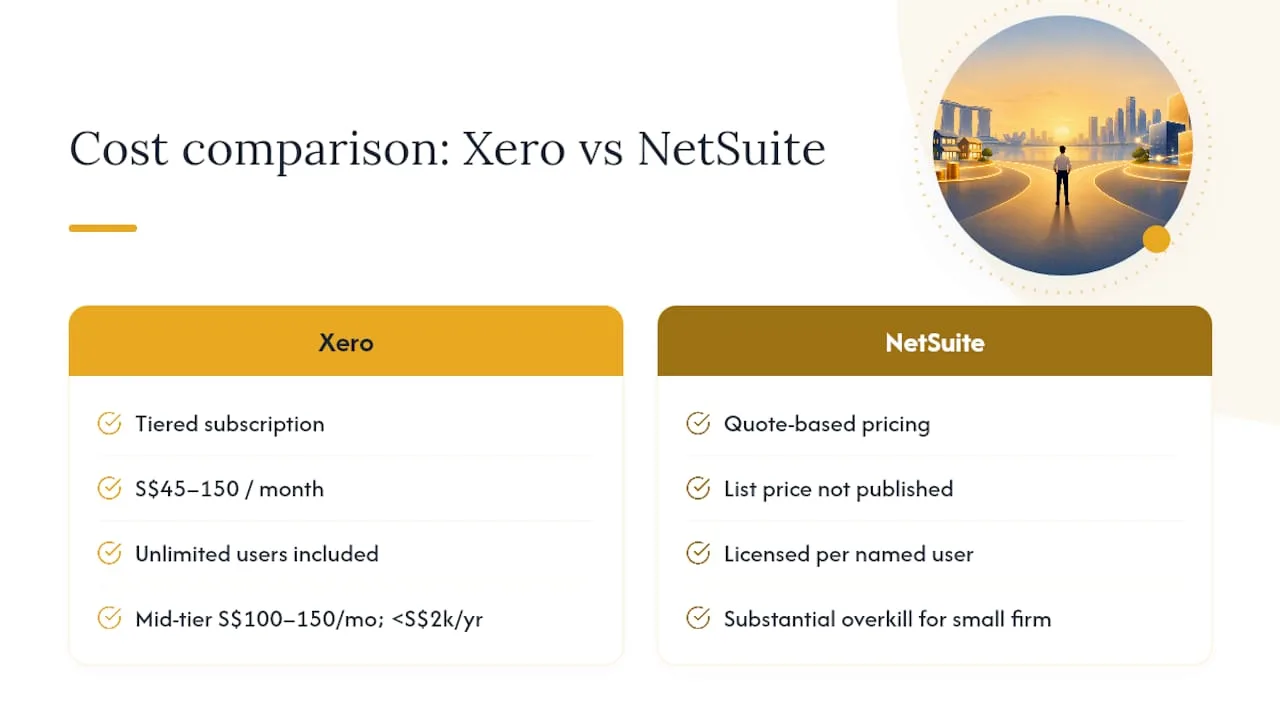
Xero’s subscription pricing runs in tiers, typically from around S$45 to S$150 per month depending on the plan, with unlimited users included on every tier, a genuine advantage over platforms that charge per seat. NetSuite doesn’t publish list pricing. It’s quote based, licensed by named user, with the price shaped by module count, user count, and implementation scope. GetFairview’s 2026 comparison notes that Xero is consistently faster and cheaper to get running, while NetSuite carries higher platform and implementation costs alongside longer project timelines.
Three representative scenarios, based on typical Singapore SME profiles:
A small services firm (five to ten staff members, single entity). **Xero at a mid-tier plan, roughly S$100 to S$150 per month, plus an accountant or bookkeeper. Annual software cost lands under S$2,000. This is the clear default; NetSuite would be substantial overkill here.
2. A mid-size product company with inventory (twenty to fifty staff, single entity, multiple warehouses). Xero plus a connected inventory app can work, but many companies at this stage start evaluating NetSuite’s native inventory module against the cost of the extra app subscriptions, integration maintenance, and reconciliation time. NetSuite implementation costs at this scale often start in the low tens of thousands SGD, spread across licensing and setup.
3. A multi-entity regional group (Singapore holding company plus subsidiaries in Malaysia or Hong Kong). Running separate Xero subscriptions per entity plus manual consolidation becomes a real finance team burden at this stage. NetSuite’s OneWorld licensing costs more upfront but replaces both the manual consolidation work and several point-solution app subscriptions.
The number that catches most finance managers off guard isn’t the software subscription. It’s what one comparison analysis calls app fatigue: the accumulated cost of running separate apps for inventory, payroll, and CRM alongside Xero, each with its own subscription fee and integration risk. At small scale, that’s a minor annoyance. At twenty-plus staff with real inventory or multi-entity needs, those stacked app costs and the hours spent reconciling them can approach or exceed what a single NetSuite license would cost.
Budget for these ongoing costs regardless of which platform you choose: bookkeeping or accounting support, annual XBRL preparation for statutory filing, and payroll processing, whether native or outsourced. Vivos handles bookkeeping and compliance and XBRL preparation for companies on either platform.
The upgrade decision rarely comes down to a single revenue number. It comes down to complexity signals that show up in your finance team’s day-to-day work.
Watch for these operational triggers:
Once two or more of these apply, start a migration checklist rather than waiting for a crisis:
Pro Tip: Assign a single internal owner for the migration, not a committee. NetSuite implementations that stall almost always trace back to unclear ownership between finance, IT, and the implementation partner.
Typical timeframes range from ten weeks for a straightforward single-entity move to six to twelve months for a multi-entity, multi-module rollout, according to implementation guidance from GetFairview. Budget for a project manager, a finance lead who knows your chart of accounts cold, and time from whoever owns your existing integrations.
InvoiceNow (Singapore’s implementation of the Peppol e-invoicing network) is built directly into Xero, available on the Starter, Standard, and Premium plans, with setup completed from inside the platform itself. Businesses that haven’t registered yet can do so through Xero directly, and advisers can register on a client’s behalf. NetSuite supports Peppol connectivity too, typically configured during implementation or through a connector, which means it’s available but requires more setup than Xero’s built-in flow.
| Connectivity factor | Xero | NetSuite |
|---|---|---|
| InvoiceNow / Peppol | Built in, available on all paid plans | Supported via implementation or connector |
| DBS, OCBC, UOB bank feeds | Direct feeds widely supported, documented on Xero’s Singapore site | Configured during implementation, bank by bank |
| EDI support | Not native; third-party app required | Available for high-volume enterprise integrations |
Bank feed reliability varies by bank and feed type. Direct feeds tend to be more stable than open-banking API connections, and coverage should be confirmed for your specific bank and account type during setup rather than assumed.
Peppol and EDI solve similar problems differently. Peppol works on a “connect once, reach all” network model: register once, and you can exchange e-invoices with any other Peppol-connected business or government agency. EDI uses direct, point-to-point connections that are more customizable but costlier to build and maintain per trading partner, according to a Peppol vs. EDI comparison from Trustpair. Most Singapore SMEs, and government suppliers in particular, are better served by Peppol/InvoiceNow. EDI still matters for large manufacturers or retailers with high-volume, industry-specific data exchange requirements. For background on what InvoiceNow means for GST-registered businesses, see Vivos’s guide to e-invoicing in Singapore.
Xero implementations typically run days to a few weeks. NetSuite projects run months, sometimes stretching past a year when multiple entities, custom modules, and legacy data migration are involved.
Three mistakes account for most of the delays and budget overruns finance teams report:
Set governance early: a named project owner, a defined testing window covering at least one full close cycle, and a hard cutover date communicated to every team touching the finance system.
Your entity count, transaction complexity, and revenue recognition needs should drive the platform decision, not your headcount alone.
| Stage | Recommended default | Watch for |
|---|---|---|
| New incorporation | Xero | Multi-entity plans from the outset |
| Growing SME | Xero, evaluate NetSuite | Inventory, revenue recognition, app fatigue |
| Regional group | NetSuite | Consolidation hours, intercompany complexity |
Before committing to either platform, ask your implementation partner: what’s the realistic timeline for our specific data volume, which modules do we actually need versus what’s being bundled, and what does post-go-live support cost in year two.
Most founders treat the Xero versus NetSuite decision as a software question. It’s really a business-structure question. The platform you need depends entirely on how many entities you’re running and how complex your revenue recognition is, not on how big your ambitions are.
The mistake I see most often: founders pick NetSuite too early because it sounds more serious, then spend a year paying enterprise licensing for features a two-person finance team never touches. The reverse mistake is just as common. A company sits on Xero for three years past the point where manual consolidation across two subsidiaries is quietly costing more in finance hours than a NetSuite license would.
“The businesses that get this right treat the accounting platform as a decision tied to entity structure, not company size,” says Ray Tay, Managing Director of VIVOS. “We see foreign founders set up their Singapore entity correctly from day one, then choose Xero or NetSuite based on how many jurisdictions they’re actually operating in, not how many they hope to be in someday.” Professional incorporation and accounting setup services can help companies choose the appropriate platform before committing to a system that doesn’t match their structure.
— Ray
Choosing between Xero and NetSuite only matters once your Singapore entity is properly set up. Vivos handles that groundwork for foreign founders: nominee resident director, registered address, corporate secretary, accounting setup, and bank account opening, so the accounting platform decision comes after the structural one, not before it.

Some corporate services firms offer company incorporation for foreign founders, including nominee resident director requirements, registered address, corporate secretary appointments, initial accounting setup, and bank account opening with local banks. Incorporation services may also be available in Malaysia, Hong Kong, and the UAE, with service delivered in multiple languages including English and Mandarin.
For founders still deciding between Xero and NetSuite, the accounting setup Vivos handles as part of incorporation includes configuring your chosen platform correctly from the start, whether that’s a fast Xero setup for a new single entity or preparing the groundwork for a future NetSuite move. Full pricing for incorporation, corporate secretary, and accounting packages is published, including nominee director renewal and accounting plans starting from S$250 per month. For companies further along that need ongoing bookkeeping, payroll, or tax structuring, Vivos supports that stage too.
If you’re incorporating in Singapore, Malaysia, Hong Kong, or the UAE and need the corporate secretarial, banking, and accounting groundwork handled before you pick your accounting platform, view VIVOS pricing and packages to see what applies to your setup.
NetSuite’s biggest downsides are cost and implementation time. Licensing is quote based and named-user, implementation typically runs ten to twenty weeks or longer for complex projects, and the platform is genuinely overbuilt for a small, single-entity business.
Some accountants find Xero’s reporting and audit trail become harder to manage once a business adds several third-party apps for inventory, payroll, or CRM, since each integration is a separate point of failure. For single-entity SMEs with straightforward operations, this rarely becomes a real problem.
QuickBooks is Xero’s most direct competitor for small-business accounting, alongside Sage for mid-market businesses wanting more robust reporting. Within the growing SME segment covered here, NetSuite competes as the upgrade path rather than a direct like-for-like alternative.
NetSuite’s closest competitors in the mid-market ERP space include Sage Intacct and Microsoft Dynamics Business Central. For companies still below multi-entity complexity, Xero often remains the more practical comparison point, even though the two serve different scales of business.

 2 January, 2025
 2 January, 2025
Cross border tax checklist for foreign founders in Singapore: four planning tools, IRAS 30 day requests, transfer pricing files and APAs.

How foreign founders pass MAS Notice 626 bank KYC in Singapore: UBO, business substance, source of funds, and practical steps to avoid multi week...

Compare the GIP's three routes and thresholds (≈S$10M, ≈S$25M, S$200M). Learn timelines, REP renewal rules, tax implications, common risks, and advisor...